Alex Romanowski
Below is how our workflow changed over the course of the past year. I worked closely with the director of the land department to screen different software systems and develope a process that suited our needs, saved time, and money.
Problem, Solution, Results
Introduction
Solar projects require differ from traditional development projects due to the added level of site screening that they must undergo. Not only do these projects require suitable slopes, no wetlands or floodplains, and permitted use within the town code, but they also require capacity on the power lines located adjacent to the site. This greatly limits the amount of sites we can develop on. This added layer of complexity hindered our speed when screening land. Additionally, we used to rely heavily on outside firms to assist in our early development process. This lead to longer lead times and more money down on projects that were not necessarily viable or likely to be approved by the zoning board.
Problem
How can we streamline our development process while lowering upfront capital costs to mitigate risk in early stage projects?
Solution Summary
We leveraged publicly available datasets to do the majority of our land screening in-house without leaving the office. We researched a multitude of software systems to create a structured development pipeline that produced accurate concept plans that could be presented to township planning boards, investors, and civil engineers for further analysis.
Results
Previous workflow:
- Land screening: bouncing between 5 different websites to check for solar suitability.
- Survey Analysis: Waiting 6 weeks and paying $20k for a land survey with topography analysis
- Final Design: Sending helioscope design (design software that simulates solar panel production) and land survey to civil engineering firm to compile finished product Revised workflow (all in-house):
- Land screening: using one subscription service to check for solar suitability.
- Survey Analysis: Utilize tax maps or deeds to plot parcel survey, pull LIDAR data from online and convert to contour lines for topography analysis.
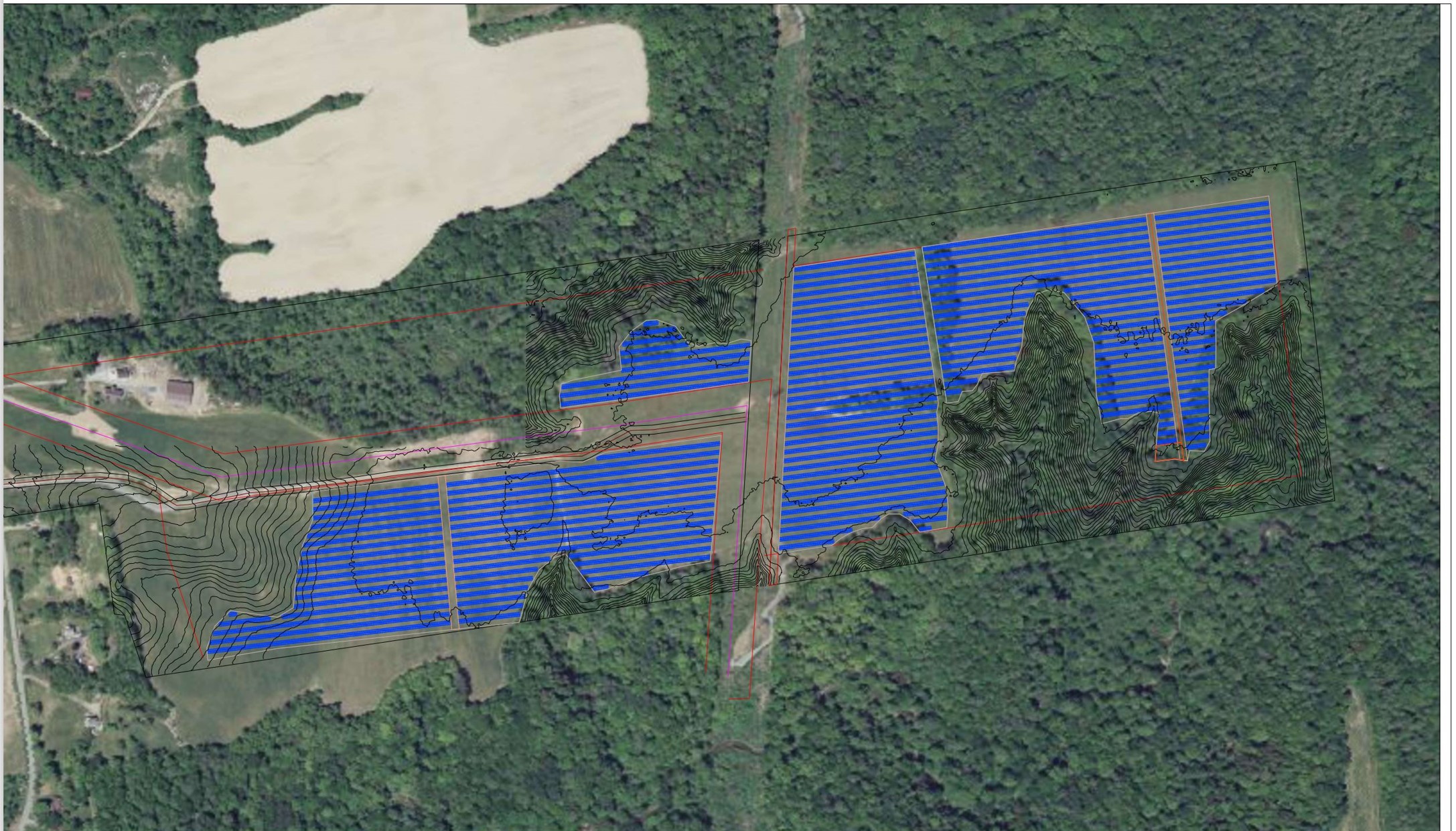
- Final Design: combine helioscope design, survey and topography data, and wetland information into a georeferenced CAD drawing that can be exported and presented.
Workflow Example: 15 MW AC Greenfield Site
I preformed the landscreening, topography analysis, and design for this site.
Land Screening
I used a subscription based software check to check the following
- Environmental Issues: floodplains, wetlands, sensitive farmland and lands of historic importance
- Slope
- Hosting Capacity: the capacity on the grid to accept incoming solar projects
- Town Code: ensure that solar is permitted and note any requirements by the township.
Preparing for a Site Walk
In order to assist the civil team with their site walk, I prepare the following
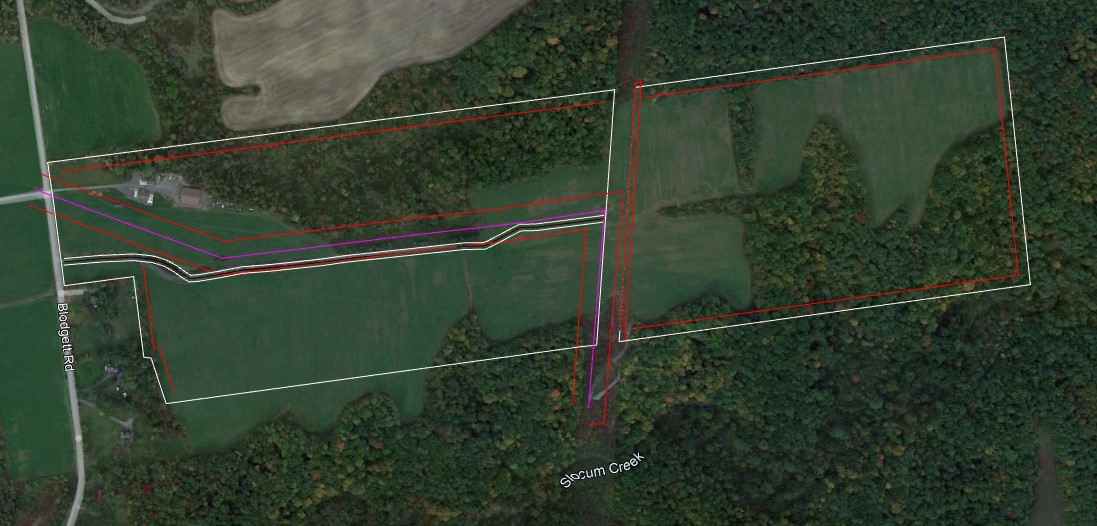
- Pull the title, old deeds, tax parcel data, or survey’s into CAD and geolocate them using the CogoEditor
- The civil team shoots control points on the ground that are referenced in the title/deeds to inform the geolocation.
- Draw and geolocate easements, roads, and notable site characteristics
- Export parcel lines and easements to Google Earth.
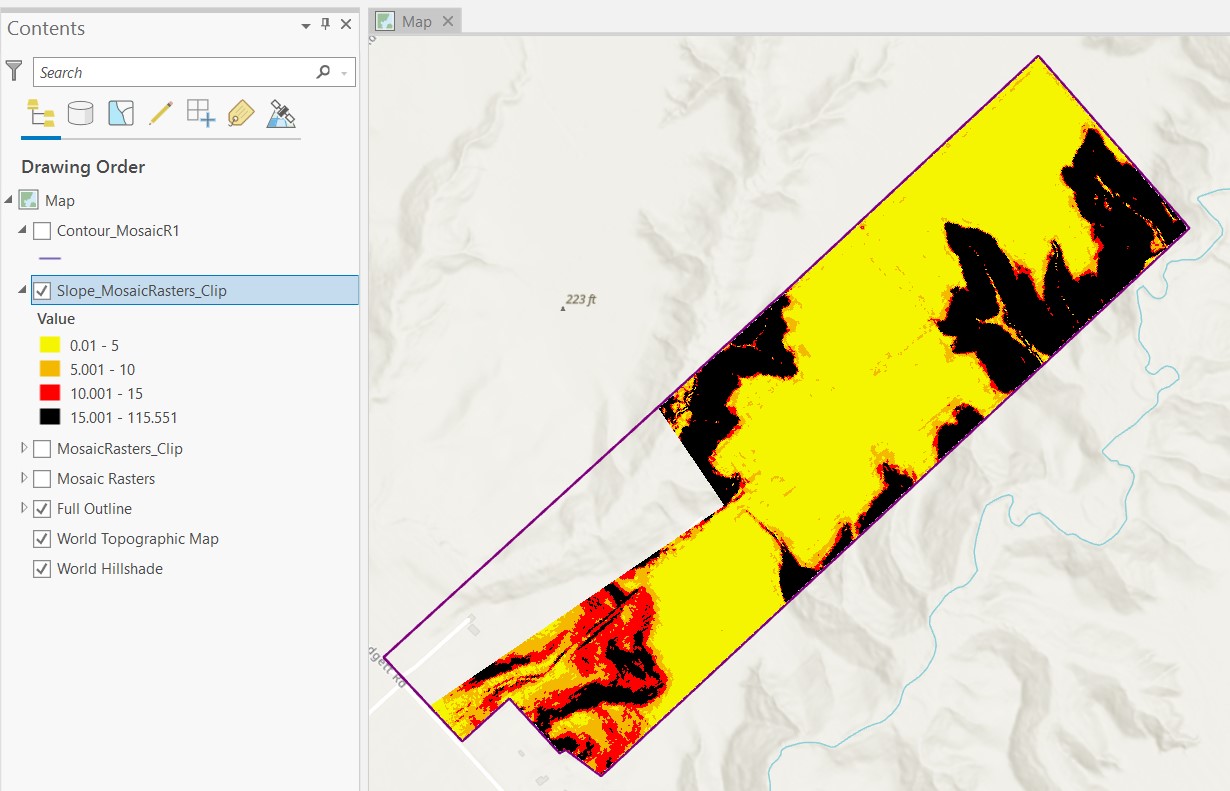
- Import LIDAR data from the state into ArcGIS, run slope and contour analysis, export into Google Earth. The resulting Google Earth file allows the civil team to track their site walk via gps, determine the slope of their current position, and note parcel boundaries. Because the civil team has more information during the site walk, they are able to get a better understanding on the costs associated with earthwork to prep the land for solar.
Parcel outline with easements, existing power lines, and roadway
ArcGIS slope analysis from LIDAR data
Site Design
Once the land has been screened, we have established site control, and walked the site (optional at this stage), the site is ready for a design.
- Helioscope: I use Helioscope to lay out a preliminary design and simulate the production of the field given shading from the surrounding area.
- Import georeferenced site walk information to CAD: parcel data, easements, and slope data
- Touch up formatting and export to PDF or Google Earth